

Core Tone Captures
NAM Lab
NAM Lab
Couldn't load pickup availability
NAM Lab is the free tool for the folder of .nam files you have collected and never quite tamed. Open thousands of captures at once, give every one of them clean, consistent, searchable information, and train new ones, all in one place. It edits only the information stored in each file. Your amp models are never altered.
Metadata, done properly
Every capture carries information inside the file: its name, the gear it was made from, tone type, who made it, levels, training details. NAM Lab is built around making that information correct, complete and consistent across your whole library.
- Edit anything. Name, gear make and model, tone type, creator, rating, notes and levels, on one capture, a selection, or the whole library at once.
- Safe by design. Only the bytes that changed are written back. The model weights stay exactly as they were.
- Bulk edit, copy and paste, and batch rename with a live preview before anything is touched.
- Rules that fill the blanks for you. Build a rule from an example filename or a pack's notes, scoped to one folder or everything, with guards so it never overwrites what you typed.
- Find duplicates by filename, name, exact file content, or "same model, different metadata", then choose which to keep.
- Clean up and rebuild a library with a preview first. Nothing changes until you approve it.
- Dashboards for the whole library and for each folder: gear types, tone types, creators, ratings, and exactly what is incomplete.
- Spreadsheet round trip. Export to Excel or CSV, edit in bulk, import back.

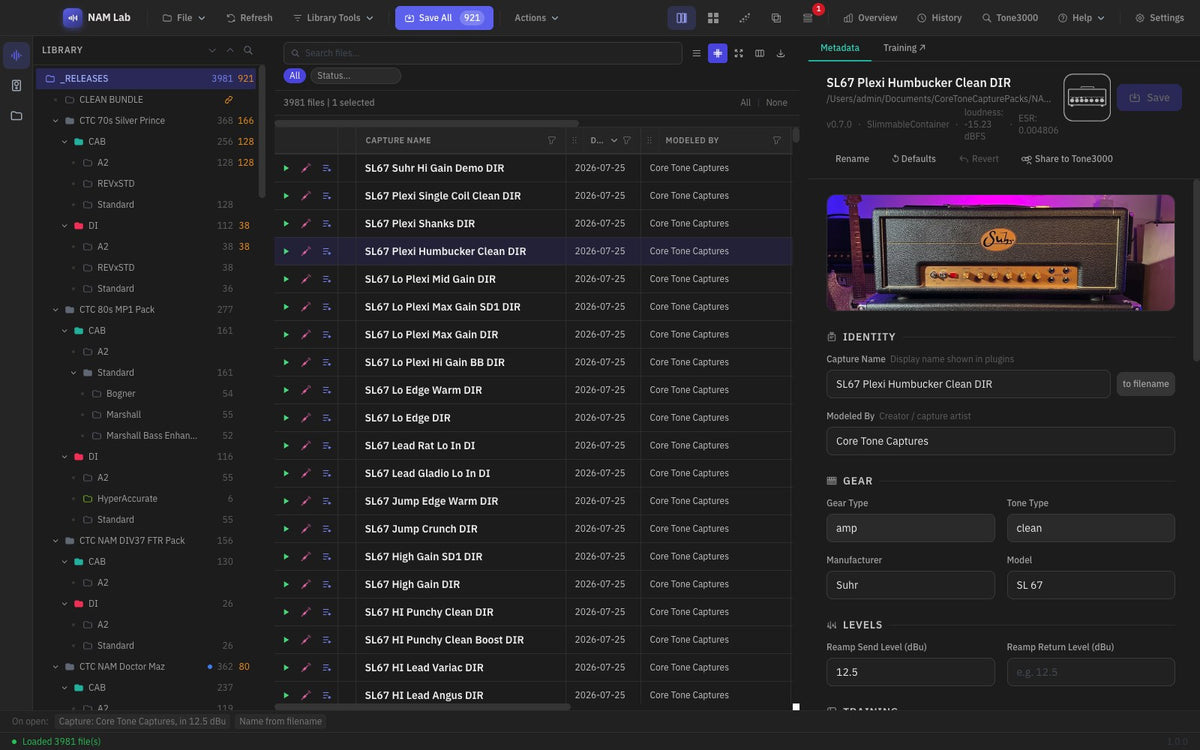
Edit one capture or hundreds: every field in one place, with the cover art, gear and levels beside it. Click to enlarge.

Your whole library at a glance: gear types, tone types and how it grew. Click to enlarge.
Train new captures
Train without leaving the app. NAM Lab drives your own installation of the free NAM trainer and wraps it in a proper workflow.
- Train both A1 and A2 captures, including A1 and A2 together in one batch.
- Queue as many runs as you like, save presets and group them into training bundles.
- Watch each run live and keep a searchable history. A retry backs up the previous .nam before overwriting it.
- Needs the free NAM trainer installed. NAM Lab drives it; it does not replace it.

Training presets: A1 and A2, epochs, ESR target and output naming. Click to enlarge.
Also included
- Browse and download from TONE3000 inside the app, with cover art and pack information filled in for you.
- Package a pack for release: Pack Info sheets with a description, glossary and equipment list, PDF export, a release checklist, and a watch folder that picks up newly finished captures.
Coming soon
These arrive with NAM Lab 1.0, alongside Core Tone Lab.
- Tone Map. Your whole library on one chart, by amp and by how hard each capture is driven. Hover over a point to hear it.
- Live player. Preview any capture over a built-in guitar clip, or play your own guitar through it with a tuner and level meters.
- IR management. The same metadata tools for your impulse response library, alongside your captures.

Tone Map: every capture on one chart, by amp and by how hard it is driven. Click to enlarge.

Live player: play your own guitar through any capture, with tuner and meters. Click to enlarge.
Works with Core Tone Lab
Open a NAM capture project in NAM Lab and back again. NAM Lab manages .nam files from any capture tool. To play a .nam in your DAW you will still need the free Neural Amp Modeler plug-in.
Download
Free for Windows and macOS (one installer for Intel and Apple Silicon). Check out for free ($0) and the download links arrive by email and appear on your order page.
The current build is not yet code-signed, so macOS and Windows will show a one-time security prompt the first time you open it. This is expected and safe to continue past. The next app will come signed for apple!
 CoreToneCaptures